


Welcome back, dudes!
So did ya check out Part One of Blog it Forward? If you want to streamline your blog reading and commenting- check it.
I have a couple more features that I have stumbled upon in my blogging journeys, and you know I love me some good blogging features; things to make us bloggers more efficient, more interesting, and better at what we do!
Today you'll see:
- Tynt: a free feature that allows you to ensure you get credit from people borrowing photos/ words from your blogs.
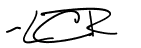
- My Live Signature: a simple, but oh-so-pretty signature generating program. I'll walk through how to implement it on your own blog.
My end product:
__________________________________________________________________
1. Tynt [to access, click here]
Tynt is a free program that you can apply to your blog. It automatically creates a link when any words or photos are taken from your blog, allowing readers to see the source of the copied information.
For example, when I copied a caption from my post "Dear Winter, Love Lauren" into a document, it looked like this:

See the blue link at the bottom? this link will bring readers back to the original site.
Tynt also reports back once a month by email how many times content has left your site, and how many links were successfully made. Giving you more information about the journey your content takes! Because lets face it, we can be good at sharing, but let's at least get the credit for our hard earned blogging!
_________________________________________________________________
2. This is a fun one-- creating a free signature for your blog!
 My Live Signature can be found here.
1. After clicking "click to start here" pick "using the signature creation wizard"
 2. Now simply write in your name and choose the font- there are so many cute choices.

3. Follow the prompts and pick a size for your signature and a background/ text colour, set the slope of your writing, and voila! Your own customized signature!
4. Choose "use this signature", on the website below where your creation appears.

5. Generate the HTML code for your signature. It should look something like this:
 important: to create this as simply a signature, and not a link-back to mysignature.com, you will erase the coding in blue, and keep the coding in red.
Now to input your signature into your blog!
1. In your dashboard click "settings" and choose "formatting"
 2. Scroll down to "post template" at the bottom, paste in the code given to you from My Live Signature, and enjoy! (remember to delete the parts in blue from the html code, as noted above.) Now every post you write will be embellished with your blogger autograph.
Hope you all enjoyed! Now quit blogging and go enjoy your weekend;)
1. Tynt [to access, click here]

Tynt is a free program that you can apply to your blog. It automatically creates a link when any words or photos are taken from your blog, allowing readers to see the source of the copied information.
For example, when I copied a caption from my post "Dear Winter, Love Lauren" into a document, it looked like this:

See the blue link at the bottom? this link will bring readers back to the original site.
_________________________________________________________________
2. This is a fun one-- creating a free signature for your blog!
 My Live Signature can be found here.
1. After clicking "click to start here" pick "using the signature creation wizard"
 2. Now simply write in your name and choose the font- there are so many cute choices.
3. Follow the prompts and pick a size for your signature and a background/ text colour, set the slope of your writing, and voila! Your own customized signature!
4. Choose "use this signature", on the website below where your creation appears.

5. Generate the HTML code for your signature. It should look something like this:
 important: to create this as simply a signature, and not a link-back to mysignature.com, you will erase the coding in blue, and keep the coding in red.
Now to input your signature into your blog!
1. In your dashboard click "settings" and choose "formatting"
 2. Scroll down to "post template" at the bottom, paste in the code given to you from My Live Signature, and enjoy! (remember to delete the parts in blue from the html code, as noted above.) Now every post you write will be embellished with your blogger autograph.
Hope you all enjoyed! Now quit blogging and go enjoy your weekend;)




 Posts
Posts


 if(document.location.protocol=='http:'){
var Tynt=Tynt||[];Tynt.push('aB9Ov8sQyr4j7zadbi-bpO');Tynt.i={"b":true,"ap":"Read more:"};
(function(){var s=document.createElement('script');s.async="async";s.type="text/javascript";s.src='http://tcr.tynt.com/ti.js';var h=document.getElementsByTagName('script')[0];h.parentNode.insertBefore(s,h);})();
}
if(document.location.protocol=='http:'){
var Tynt=Tynt||[];Tynt.push('aB9Ov8sQyr4j7zadbi-bpO');Tynt.i={"b":true,"ap":"Read more:"};
(function(){var s=document.createElement('script');s.async="async";s.type="text/javascript";s.src='http://tcr.tynt.com/ti.js';var h=document.getElementsByTagName('script')[0];h.parentNode.insertBefore(s,h);})();
}
9 comments:
what great tips! I will go play around with a signature, how fun :)
oh my gosh, that is so cool! i think i want my own signature! :D
<3, Mimi
http://whatmimiwrites.blogspot.com/
another awesome day of tips! Thanks so much girl - you know I love this ;)
I love my signature from my live signature. :) That Tint thing sounds very cool and I may just do that...
that tynt thing is so so interesting!!! and i tried putting that next button in my links thing but it's so not working :(
THANK you for that link to those birds! They're sooo cute!! :D
Lauren, you are wow lades! i love these 1st 2 blog it forward segments. very clever idea and kind thing to do, especially for peeps starting out who are unfamiliar with all the blog garb that's out there. ace job with the tuts too. happy weekend! ♥
pea ess: thanks for your comment - love love loved the grope shout out! way to nail it girl.
First off, LOVE your new look! Your header is gorgeous!! And these tips, I am gonna be back, b/c there is so much I still have to learn.
As for the comment you left over at my place, thank you! And, no, I do not use a flash - not usually, anyway. My house is bathed in natural light pretty much the entire day!!
Happy day...
smart, i think more bloggers should do this, it shouldn't be such a mystery to figure out how things work!
Post a Comment